In March I
posted about getting
Google's Pinyin IME to use the
Dvorak keyboard layout as it's default instead of the standard Qwerty. I made that post in part because I had to figure that problem out on my own and didn't want others to have to go through it, and in part so I could find my hack again if I ever needed it. Funnily enough I ended up needing it again less than a month later for another install I did.
Anyhow, I decided to install Google's Pinyin IME onto my Windows 7 computer, and I had the same issue of it wanting to use the standard Qwerty layout. I did some googling and found how someone
fixed the issue for the standard Simplified Chinese Pinyin layout, and from that I was able to apply my own fix.
Below are my steps for installing it. With anything you find off the internet, your trying this AT YOUR OWN RISK. Don't blame me if something goes wrong. These steps work for me, and they should work for you, but I am not responsible for you, or your things, your a grown up, don't pout.
- Go to the Google page and download the installer.
- Install the program. I mostly hit the next button. I did check the box for collecting anonymous stats, and signed in with my Google account, but you can choose not to do those things.
- After it was installed, I opened a notepad and verified it worked, and was using the Qwerty layout instead of Dvorak.
- Next I opened regedit
- Click the Start button.
- Click in the search box to start a new search.
- Type "regedit" without the quotes.
- Above it an icon of a blue Rubik cube and the word Regedit will appear.
- Click on that.to open the regedit program.
- Click, yes when it asks if your sure you want to continue.
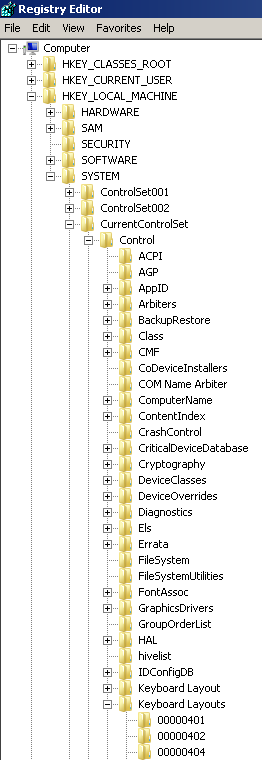
- Inside of the regedit program I navigated to the appropriate place by clicking the + symbols next to each of the following words.
- Computer
- HKEY_LOCAL_MACHINE
- SYSTEM
- CurrentControlSet
- Control
- Keyboard Layouts ( There is also a Keyboard Layout directory. This is the wrong directory.)
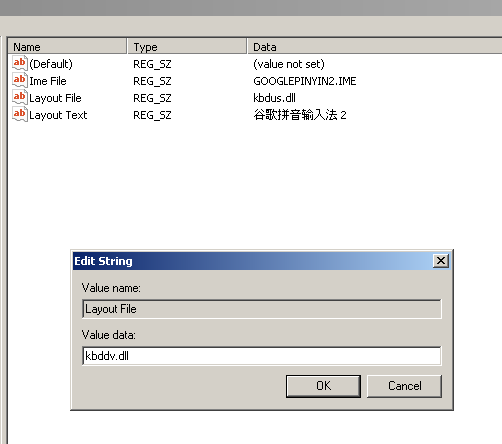
- E0200804 ( Your layout may be in a differently named folder. The best way to tell is by looking at the right side. "Layout text" should say "谷歌拼音输入法 2" or "Google Pinyin" or something similar.)
- Once you have found the right spot Double click the "Layout File" words.
- In the popup box change the value from "KBDUS.DLL" to "KBDDV.DLL" Upper or lower case should not matter.
- Click OK.
- Close regedit.
- Log Out of windows( not hibernate, or suspend, or lock ).
- Log back in and try it out.
- Profit. ^_^
I hope this helps. I'm sure it will help me on my next re-install or update. Now for my obligatory inflammatory statement, which is a reminder that Dvorak is
a better keyboard layout than Qwerty, not only for English but also for Pinyin. Even if you don't like Dvorak, at least look at what is out there. There are
quite a few different layouts available and tailored for different purposes. It is surprising how fast someone can pick a new one up, and start benefiting from it.

